
Furigana
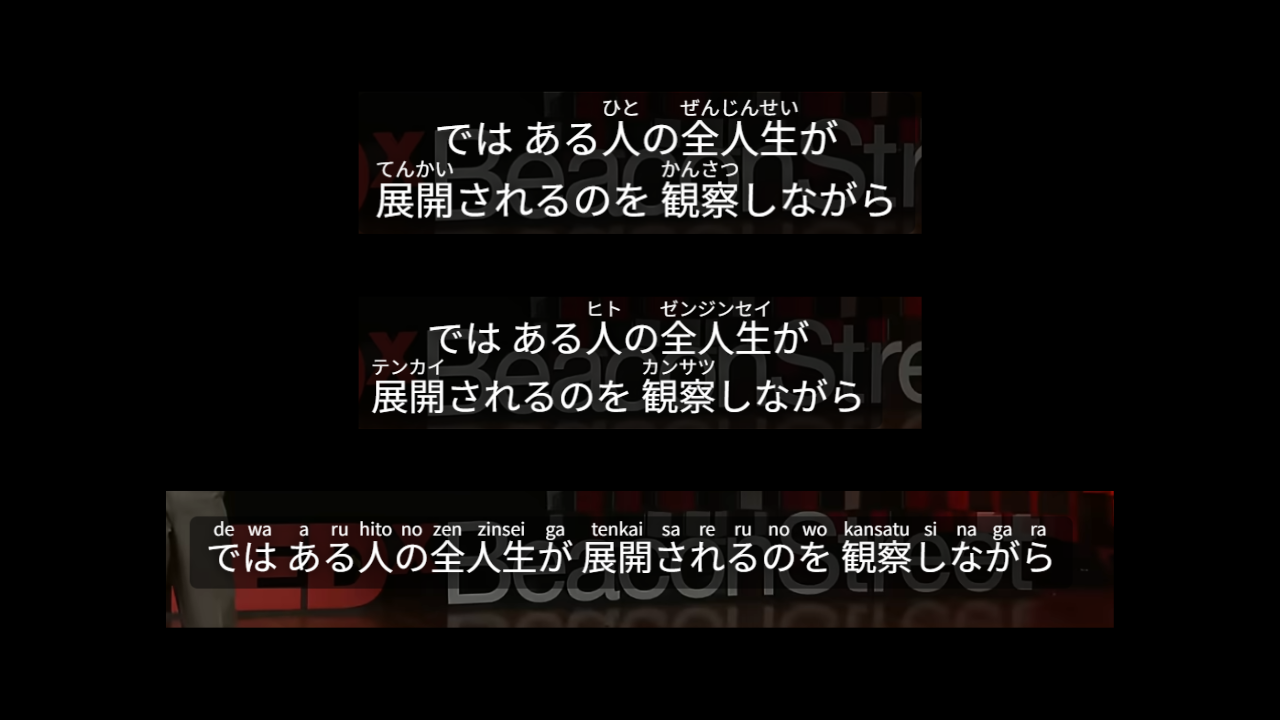
Automatically add furigana or romanization above Japanese kanji so you can follow along even when you don't know the reading.
Kanji readings trip up many Japanese learners. Turn on Furigana and readings appear above kanji automatically.
How to use
Enable Furigana in the Settings tab. It only affects Japanese subtitles—other languages are unchanged.
Annotation options
- Hiragana: Most common; works for most cases.
- Katakana: Switch when you need it.
- Romanization: If you’re still learning kana, start with romaji (supports Hepburn, passport, and Kunrei systems).
When it helps
- J-drama or anime when you hit kanji you can’t read.
- Early stages when you want to follow pronunciation with romanization.
- Pair with Subtitle reader to see and hear readings together.